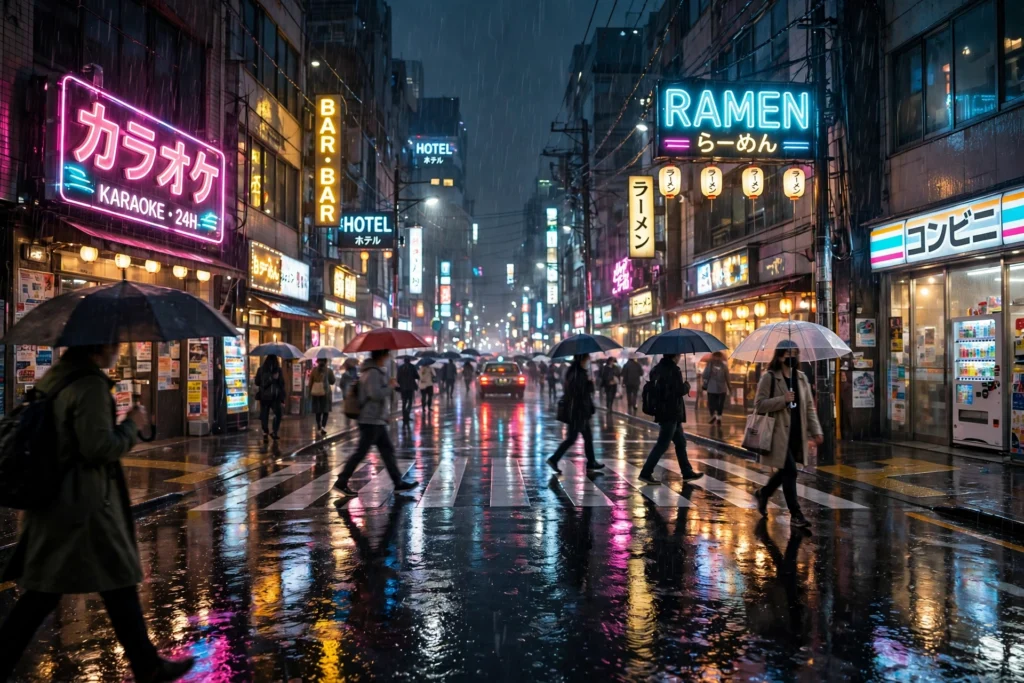
Rain changes a city completely. Neon signs double in wet pavement, streets empty out, and every light feels warmer against the dark. These night city rain AI video prompts help you capture that moody, cinematic feeling — no waiting for a storm, no wet camera gear, and no late-night shoot needed. Whether you make lo-fi content, travel videos, cyberpunk edits, or relaxing rain ambience, these four prompts give you complete night scenes that are ready to generate.
Each prompt is copy-paste-ready, with the setting, the rain, the lights, and the camera movement already written in. Use one scene for a quick Reel, or join all four into a short rainy-night story: a neon street, a quiet alley, glowing traffic, and a rain-soaked skyline from above.
Table of Contents
- Why Rainy Night City Videos Look So Cinematic
- 4 Night City Rain AI Video Prompts
- Prompt 1: Neon Street in the Rain
- Prompt 2: A Quiet Umbrella Alley
- Prompt 3: Traffic and Reflections in Heavy Rain
- Prompt 4: Rainy Skyline From a Rooftop
- Tips to Make Your Night City Rain Videos Look Cinematic
- FAQs About Night City Rain AI Video Prompts
- Conclusion
Why Rainy Night City Videos Look So Cinematic
Rain is a filmmaker’s best friend at night. Wet roads act like mirrors, doubling every neon sign, headlight, and shop window, so even a simple street looks layered and rich. Rain also adds constant motion — falling drops, splashes, and ripples — which keeps a video alive even when the camera barely moves. That is why rainy city clips work so well as lo-fi backgrounds, moody travel content, and atmospheric Shorts.
For AI video, night rain scenes are a strong match when the prompt stays focused. Neon colors give the model clear, bright subjects against the dark, and reflections on wet pavement hide small imperfections that would be obvious in bright daylight. Keep the scene simple — one street, one weather effect, one main light source — and the result will look far more believable.
If you like night and atmospheric themes, you will also enjoy our magical-forest-fireflies-night-ai-video-prompts, our winter-christmas-market-ai-video-prompts, and our serene-beach-sunset-sailboat-ai-video-prompts for a calmer evening mood.
4 Night City Rain AI Video Prompts
Use these scenes in order for a natural rainy-night walk: the busy neon street, a quiet side alley, the rush of traffic, and finally the whole city from a rooftop.
Prompt 1: Neon Street in the Rain

Prompt title: Neon Street in the Rain
Copy-paste prompt: “Cinematic rainy night city street, glowing neon signs in pink, blue and yellow reflecting on wet pavement, people walking with umbrellas, steady rainfall, light mist, slow forward camera movement down the street, moody cyberpunk atmosphere, photorealistic, 4K quality.”
Image-prompt idea: A neon-lit city street at night in the rain, colorful signs reflected on wet pavement, umbrellas, and mist.
Why it works: This is the signature rainy-city shot. Neon and reflections do the visual work, the rain adds motion, and a slow forward move makes the viewer feel like they are walking into the scene.
Prompt 2: A Quiet Umbrella Alley

Prompt title: A Quiet Umbrella Alley
Copy-paste prompt: “Cozy rainy night alley in an old city, a person with a glowing umbrella walking slowly past warm shop lights, rain falling gently, wet cobblestones reflecting golden light, steam rising from a street food stall, slow steady camera shot, intimate and peaceful mood, cinematic, photorealistic.”
Image-prompt idea: A person with a glowing umbrella in a rainy old-city alley, warm shop lights, wet cobblestones, and gentle rain.
Why it works: After the busy neon street, a quiet alley adds emotion and story. One person, one umbrella, and warm light are enough to make viewers feel something — and feeling is what makes people save and share a video.
Prompt 3: Traffic and Reflections in Heavy Rain

Prompt title: Traffic and Reflections in Heavy Rain
Copy-paste prompt: “Night city traffic in heavy rain, car headlights and red taillights reflecting on the wet road, skyscrapers and neon lights in the background, rain streaking through headlight beams, slow camera pan across the traffic, energetic urban mood, cinematic, photorealistic.”
Image-prompt idea: Night traffic in heavy rain, headlights and taillights reflected on a wet road, neon skyscrapers behind.
Why it works: Traffic adds energy and scale. The moving lights and reflections create a dynamic, almost musical rhythm, which makes this prompt perfect for lo-fi edits, music visuals, and city montages.
Prompt 4: Rainy Skyline From a Rooftop

Prompt title: Rainy Skyline From a Rooftop
Copy-paste prompt: “Rainy night city skyline seen from a rooftop, rain streaks in the foreground, glowing skyscraper windows, mist drifting between towers, distant lightning glow on the horizon, slow wide camera shot, vast and dreamy mood, cinematic, photorealistic.”
Image-prompt idea: A rainy night skyline from a rooftop, glowing windows, mist between towers, and rain in the foreground.
Why it works: A rooftop view gives your rainy-night story a satisfying ending. After street-level scenes, pulling back to the whole skyline shows the full city in the rain — a perfect closing shot or a looping background for long videos.
Tips to Make Your Night City Rain Videos Look Cinematic
First, always name the reflections. Words like “reflecting on wet pavement” and “lights reflected on the wet road” tell the model to create the mirror effect that makes rainy night video look expensive. Second, keep the camera slow. Fast moves in rain often blur into a mess, while a slow forward move or a gentle pan keeps neon signs readable and reflections steady.
For tools, try the Runway AI video generator for cinematic camera moves, read about Pika H3 Flex for quick social clips, or check Google’s Veo documentation for text-to-video generation. If a scene looks too dark, add one warm light detail — a shop window, a street lamp, or a glowing umbrella — rather than asking for overall brightness, which can wash out the neon.
Finally, add rain sound. Steady rainfall, distant traffic, or soft lo-fi music will complete the mood instantly. Start your edit on the frame with the strongest reflection — neon doubled in wet pavement — because that first frame tells viewers this is a cinematic rainy night, not just a dark street.
Watch
FAQs About Night City Rain AI Video Prompts
Q1. What are night city rain AI video prompts?
A1. They are detailed text descriptions that instruct an AI video tool to create a rainy city night scene, including the street, the rain, the lights and reflections, and the camera movement, so you get a finished clip without filming at night in the rain.
Q2. Which AI video tool is best for rainy night city videos?
A2. Runway is excellent for cinematic street moves, Pika works well for fast social clips, and Google Veo handles rain and reflections realistically. Test the same prompt in two tools and keep the version with the steadiest signs and most natural rain.
Q3. How long should a night city rain AI video be?
A3. For Reels and Shorts, 8 to 15 seconds per scene is ideal. For lo-fi or ambience content, loop one scene or join all four prompts into a longer rainy-night sequence.
Q4. Can I use these prompts for lo-fi or music videos?
A4. Yes, rainy night city scenes are a classic lo-fi visual. The prompts are free to use; for generated videos, check your AI tool’s licence terms for commercial or monetised use, as plans differ.
Q5. How do I stop neon signs from looking garbled in AI video?
A5. Keep signs simple — describe colors and glow rather than asking for readable text — and keep the camera slow. AI models often distort text, so abstract neon shapes look far cleaner than signs with specific words.
Q6. Can I change the city or style in these prompts?
A6. Yes. Add a city feel — for example, “Tokyo-style neon streets,” “old European alley,” or “futuristic cyberpunk city” — and the same prompt structure will produce a fresh rainy-night scene in that style.
Conclusion
Night city rain is one of the most atmospheric themes in AI video, because rain, neon, and reflections already create cinema on their own. Start on a neon street, slip into a quiet umbrella alley, feel the energy of traffic in heavy rain, and end above it all on a rainy rooftop. Copy any prompt above, generate it, and your next moody city video could be ready tonight.