
Mount Fuji is Japan’s most sacred mountain, its most photographed peak, and one of the calmest subjects you can give an AI video tool: a perfect cone, a still lake, and a sky that does the drama for you. These mount fuji ai video prompts turn that calm into four ready-to-generate clips — the Chureito Pagoda, Lake Kawaguchi at dawn, the spring ponds of Oshino Hakkai, and Fuji framed by autumn maples. Paste one into Sora, Runway, Kling, Veo or Hailuo and you will have a serene Japan film in minutes.
Mount Fuji rises 3,776 metres above sea level on the border of Shizuoka and Yamanashi prefectures, and it is Japan’s tallest mountain. It is an active volcano that last erupted in 1707, a UNESCO World Heritage Site since 2013, and a place of pilgrimage for centuries — climbers still ascend it every summer, and artists have painted it for hundreds of years. That long visual history is a gift for AI creators: the models have seen Fuji from every angle and in every season, so they render its shape unusually accurately, as long as your prompt keeps the mountain as the one clear hero.
Table of Contents
- 4 Mount Fuji AI Video Prompts
- 1. Chureito Pagoda and Cherry Blossoms
- 2. Lake Kawaguchi Reflection at Dawn
- 3. Oshino Hakkai Spring Ponds
- 4. Mount Fuji in Autumn Maples
- Tips to Make Your Mount Fuji AI Videos Look Real
- Watch: Mount Fuji Tour in 4K
- Frequently Asked Questions
- Conclusion
4 Mount Fuji AI Video Prompts
Below are four ready-to-use mount fuji ai video prompts, one for each of Fuji’s most iconic views. Use them in 16:9 for YouTube, or add “vertical 9:16, for Instagram Reels” to any prompt to reframe it for Shorts and Reels. Fuji rewards patience: slow camera moves, soft light, and very little motion in the frame. The mountain is the star — everything else is a frame around it.
1. Chureito Pagoda and Cherry Blossoms
This is the most famous view of Mount Fuji in the world: the red five-storey Chureito Pagoda, pink cherry blossoms, and the snow-capped peak behind them. It is the strongest opening clip for any Fuji video because viewers recognise it in a single second.
Cinematic wide shot of the red Chureito Pagoda in Japan with snow-capped Mount Fuji behind it. Pink cherry blossom branches frame the scene, soft petals drift gently through the air, clear blue sky, morning light. Camera pushes in slowly toward the pagoda, the mountain holding steady in the background. Serene, iconic, photorealistic, 4K, 10 seconds, no text.Image-prompt idea: “Chureito Pagoda in Japan with Mount Fuji behind it, red five-storey pagoda, pink cherry blossoms framing the scene, snow-capped peak, clear blue sky, photorealistic travel photography.”
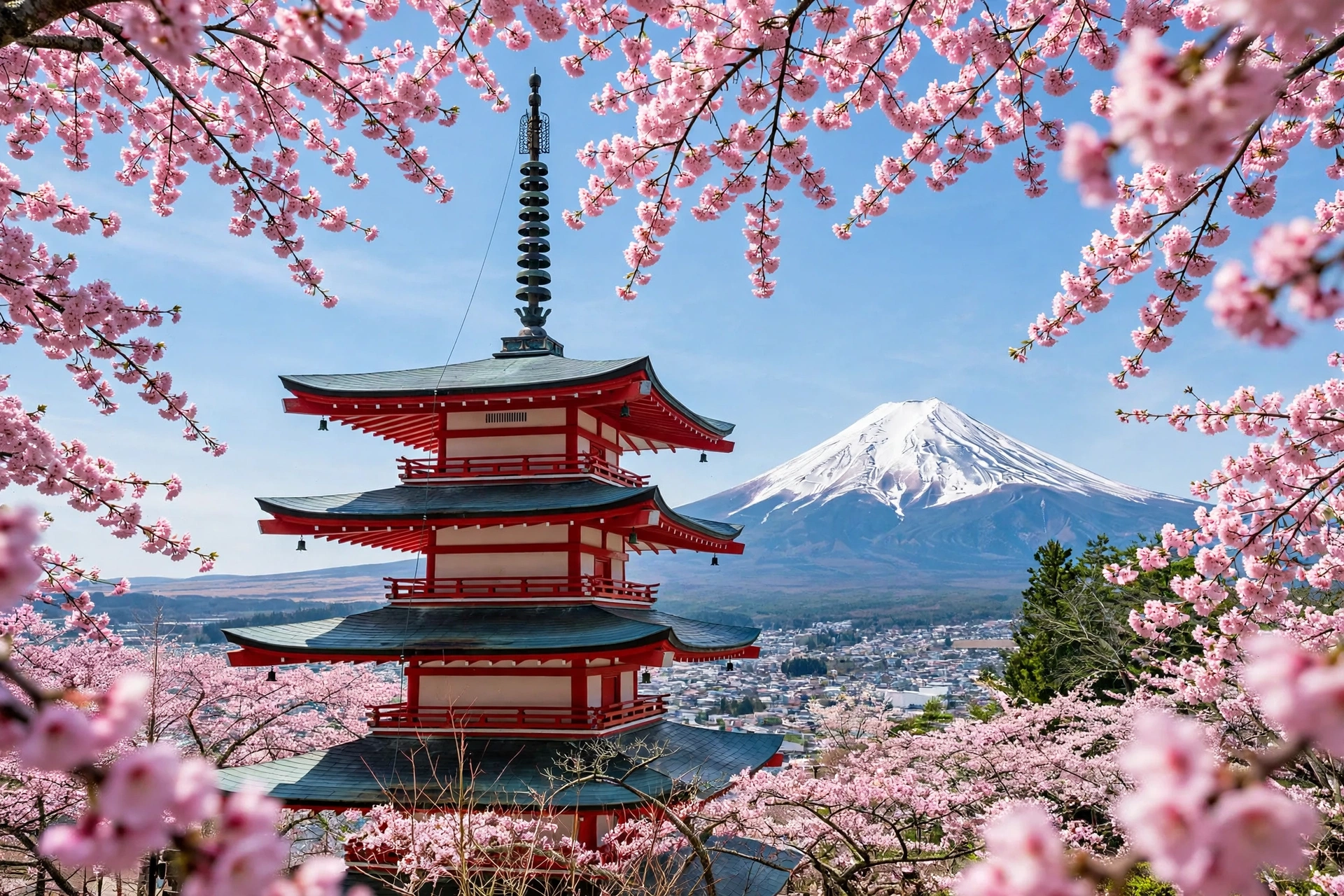
Why it works: the composition has three clear layers — blossoms in front, pagoda in the middle, mountain behind — and the model can hold all three because each one is named. The drifting petals add the only motion the scene needs.
2. Lake Kawaguchi Reflection at Dawn
On a still morning, Lake Kawaguchi mirrors Mount Fuji perfectly — the famous “upside-down Fuji”. A dawn reflection shot is the calmest clip of the four, and the best one for a meditation-style video, a lo-fi edit, or the quiet middle of a travel film.
Cinematic wide shot of snow-capped Mount Fuji reflected perfectly in the still water of Lake Kawaguchi, Japan at dawn. Soft pink and gold sky, a small wooden boat drifting slowly on the glassy lake, thin mist over the far shore. Camera holds steady, then tilts down gently from the peak to its reflection. Peaceful, dreamlike, photorealistic, 4K, 10 seconds, no text.Image-prompt idea: “Mount Fuji reflected perfectly in the still water of Lake Kawaguchi at dawn, snow-capped peak mirrored in the lake, soft pink sky, small wooden boat, photorealistic travel photography.”
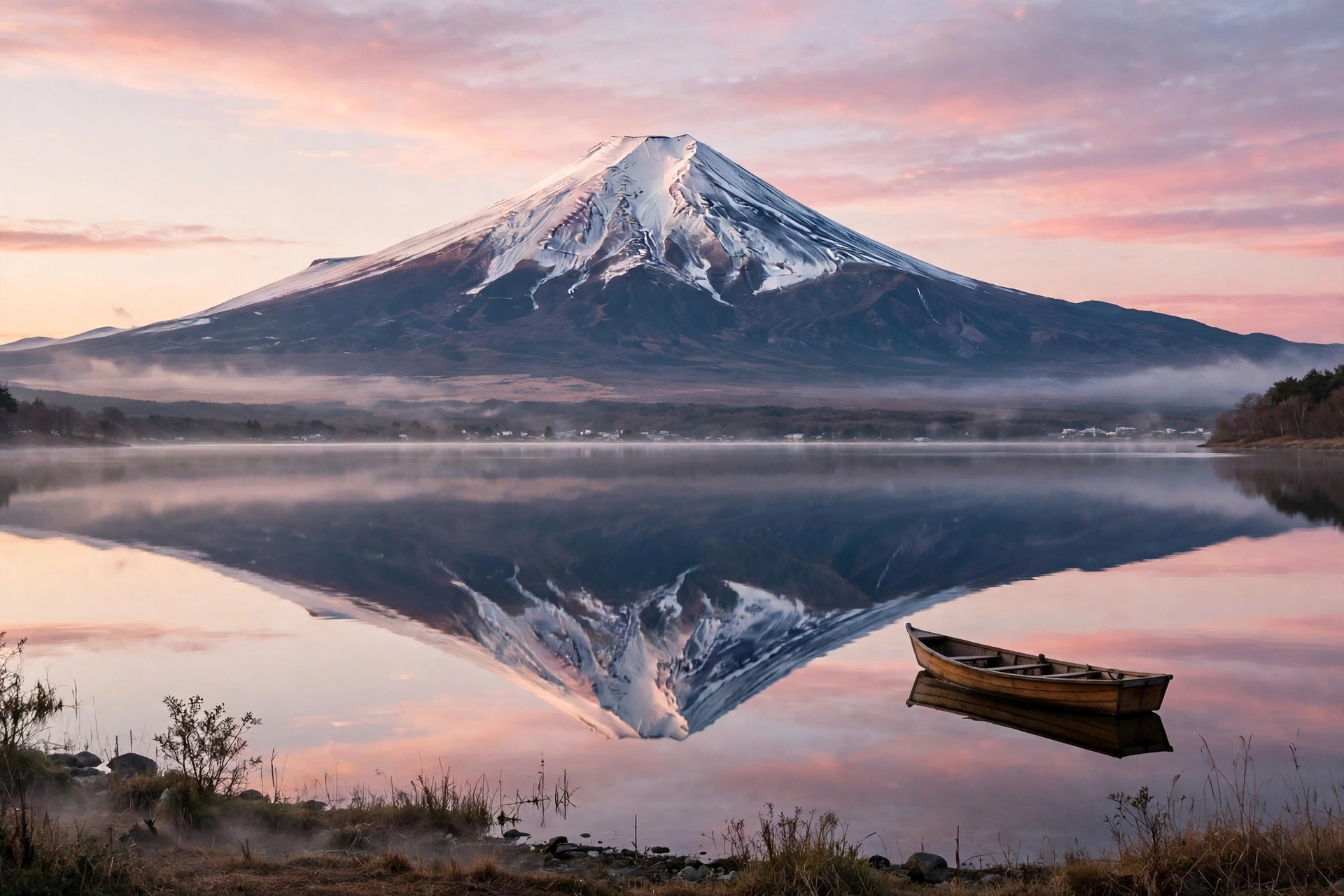
Why it works: still water is risky in AI video, so the prompt keeps the motion minimal — a drifting boat, a slow tilt — instead of asking for ripples or waves. The reflection gives the frame perfect symmetry, which models love and viewers find deeply calming.
3. Oshino Hakkai Spring Ponds
Oshino Hakkai is a small village of eight crystal-clear spring ponds fed by Mount Fuji’s snowmelt, with thatched-roof farmhouses and the mountain towering behind. It is the most human-scale of the four scenes — a village, not just a mountain — and it adds warmth and story to your film.
Cinematic shot of Oshino Hakkai village in Japan: crystal-clear spring ponds in the foreground, traditional thatched-roof farmhouses, green fields, and snow-capped Mount Fuji towering in the background. A gentle breeze moves the grass, water shimmers in the ponds, bright daylight. Camera pans slowly from the ponds up to the mountain. Fresh, peaceful, photorealistic, 4K, 10 seconds, no text.Image-prompt idea: “Oshino Hakkai village in Japan, crystal-clear spring ponds, traditional thatched-roof farmhouses, Mount Fuji towering snow-capped in the background, green fields, photorealistic travel photography.”

Why it works: the slow pan from the ponds up to the mountain is a natural storytelling move — it starts small and ends epic. Naming the thatched roofs and the spring water keeps the village looking like Oshino Hakkai rather than a generic Japanese village.
4. Mount Fuji in Autumn Maples
Autumn is Fuji’s most colourful season: red and orange maple leaves frame the snow-capped peak, and the low golden light makes the whole scene glow. It is the warmest, most emotional clip of the four, and the perfect closer.
Cinematic shot of Mount Fuji in autumn, Japan: brilliant red and orange maple leaves frame the snow-capped peak, a quiet lakeside path covered in fallen leaves, soft golden afternoon light, a few leaves drift down through the air. Camera pushes in slowly through the maple branches toward the mountain. Warm, nostalgic, photorealistic, 4K, 10 seconds, no text.Image-prompt idea: “Mount Fuji in autumn, Japan, brilliant red and orange maple leaves framing the snow-capped peak, quiet lakeside path with fallen leaves, golden afternoon light, photorealistic travel photography.”

Why it works: the maple branches act as a natural frame, which is a composition trick models handle well — the frame stays still while the camera moves through it. Falling leaves give the scene gentle motion without disturbing the mountain’s perfect stillness.
Tips to Make Your Mount Fuji AI Videos Look Real
Keep Fuji still. The mountain should never move, warp or breathe. If a generation makes the peak wobble, shorten the clip to 5 seconds, slow the camera move, and add “mountain perfectly still, only the foreground moves” to the prompt.
Use the seasons as your palette. Cherry blossom pink in spring, deep green in summer, red maple in autumn, white snow in winter — each season is a complete colour story. Mixing seasons in one prompt (“cherry blossoms and autumn leaves”) confuses the model and looks wrong.
One camera move per clip. A push-in, a slow tilt, a gentle pan — pick one. Fuji’s clean cone shape punishes busy camera work; a single smooth move keeps the peak perfect.
Generate the still first. For the pagoda and reflection shots especially, generate the image, check Fuji’s shape and the reflection’s symmetry, then animate with image-to-video. A wrong still will never become a right video, and one image credit is cheaper than five failed rolls.
Cut in journey order. Pagoda (the icon), Lake Kawaguchi (the calm), Oshino Hakkai (the village), autumn maples (the emotion) — that is a complete Japan journey in 40 seconds. Add a soft piano or koto track, keep the cuts slow, and let the mountain hold the frame.
For more Japan inspiration, try our Japanese tea garden AI video prompts and our Kyoto autumn temple AI video prompts, or go somewhere historic with our Taj Mahal sunrise AI video prompts.
Watch: Mount Fuji Tour in 4K
Before you generate, watch the real mountain — this 4K travel vlog from amtravel_vlogs tours Arakurayama Sengen Park, Oshino Hakkai, Lake Kawaguchi and Oishi Park around Mount Fuji, and it is the best reference for how the peak, the lakes and the villages actually look together.
Frequently Asked Questions
Which AI video tool works best for Mount Fuji prompts?
Sora, Runway Gen-4, Kling and Google Veo all render Mount Fuji well, because the mountain’s simple cone shape is easy for models to hold. Sora is strongest on realistic light and water, Runway gives the most camera control, and Kling is the best budget option for 5–10 second clips. The prompts above are tool-neutral.
Why does my AI Mount Fuji look warped or lopsided?
Usually because the prompt asked for too much camera movement or too many subjects. Fuji’s symmetrical cone needs a slow, simple camera move and a clean frame. Shorten the clip to 5 seconds, use one move, and add “mountain perfectly still, symmetrical cone” to the prompt.
Can I use these Mount Fuji AI videos commercially?
It depends on your AI tool’s plan and terms — most paid plans allow commercial use of generated video, while free tiers often do not. Check your tool’s licence before using a clip in a client project or monetised video, and never present AI footage as real drone footage of Mount Fuji.
How long should each Mount Fuji AI clip be?
Five to ten seconds per clip is ideal. Longer generations give the model time to warp the peak and drift the camera. Generate four 10-second clips and edit them together instead of asking for one 40-second video.
Can I make vertical versions for Reels and Shorts?
Yes. Add “vertical 9:16 aspect ratio, framed for a phone screen” to any prompt above, and keep Mount Fuji in the centre of the frame so the peak survives the crop.
What is the best season to show Mount Fuji in AI videos?
Spring (cherry blossoms, late March to April) and autumn (red maples, November) are the most photogenic and the most recognisable. Winter gives you the cleanest snow-capped peak against a blue sky, while summer is the greenest — but Fuji is often hidden by cloud in summer, so the models’ summer versions can look hazy.
Conclusion
Mount Fuji does not need drama — it is drama, standing still at 3,776 metres while the seasons change around it. These four mount fuji ai video prompts give you the mountain’s greatest views: the Chureito Pagoda, the Lake Kawaguchi reflection, the spring ponds of Oshino Hakkai, and Fuji framed by autumn maples. Copy them, generate your stills first, keep one camera move per clip, and edit the four scenes into a 40-second film. Your viewers will feel the calm of Japan — and your only journey was a prompt.
Learn more from Wikipedia’s Mount Fuji page, the Japan Guide to Mount Fuji, and the Mount Fuji live cameras page to check the mountain’s real conditions before you generate.
Pingback: Kyoto AI Video Prompts: 4 Cinematic Prompts for Bamboo Groves, Torii Gates & Gion at Dusk