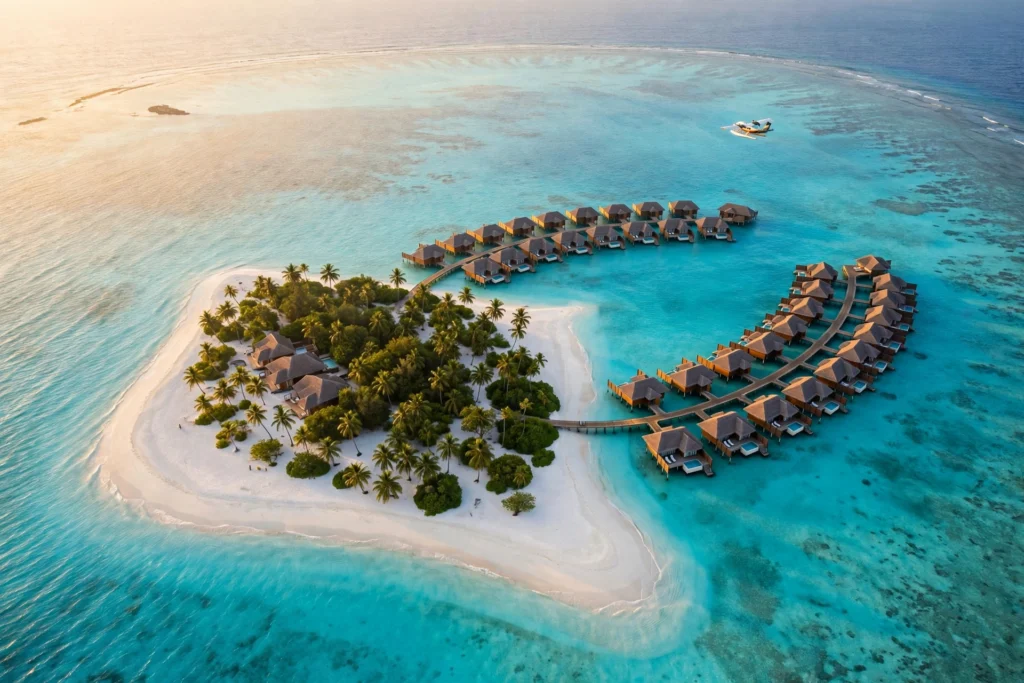
There is a reason the Maldives is the most reposted paradise on the internet: water so clear you can see the sand from a plane, villas standing on stilts above a lagoon, and sunsets that look colour-graded straight out of the camera. With these maldives ai video prompts, you can recreate that postcard without booking a seaplane — just copy a prompt below into Sora, Runway, Kling, Veo or Hailuo and watch the Indian Ocean come alive. Each prompt is written as a complete shot, with the camera move, light and mood already built in, so even a first-time creator gets a cinematic result.
The Maldives is a chain of 1,192 coral islands grouped into 26 atolls in the Indian Ocean, southwest of India and Sri Lanka. It is the lowest-lying country on Earth, with an average ground level of about 1.5 metres and a highest natural point of only 2.4 metres. Only around 200 islands are inhabited, and roughly 150 operate as resort islands under the country’s famous one-island, one-resort rule. That mix of tiny white-sand islands, impossibly turquoise lagoons and wide open sky is exactly what AI video tools render best: strong colour contrast, one obvious hero subject in every frame, and water that gives every shot natural motion.
Table of Contents
- 4 Maldives AI Video Prompts
- 1. Overwater Villa at Sunrise
- 2. Seaplane Arrival Over the Atolls
- 3. Snorkelling with a Whale Shark
- 4. The Glowing Beach at Night
- Tips to Make Your Maldives AI Videos Look Real
- Watch: Maldives Travel Video in 4K
- Frequently Asked Questions
- Conclusion
4 Maldives AI Video Prompts
Below are four ready-to-use maldives ai video prompts, one for each of the Maldives’ most iconic scenes. Use them in 16:9 for YouTube, or add “vertical 9:16, for Instagram Reels” at the end of any prompt to reframe it for Shorts and Reels. Keep the camera move to one per clip — a slow push-in, a gentle aerial drift, or a smooth underwater glide — because AI tools handle a single clear movement far better than three at once.
1. Overwater Villa at Sunrise
The single most recognisable shot of the whole Maldives: a villa on wooden stilts above a glassy lagoon, shot as the sun comes up and turns the water pink and gold. This is your thumbnail shot and your opening clip — it tells viewers where they are in two seconds, and it is the image every travel reel is chasing.
Cinematic slow aerial push-in over an overwater villa on wooden stilts in the Maldives at sunrise. A private deck with sun loungers, palm trees on a white sand island behind, calm turquoise lagoon with gentle ripples reflecting a pink and gold sky. Soft morning light, no people, photorealistic, 4K, smooth slow drone movement, 10 seconds, no text.Image-prompt idea: “Overwater villa on wooden stilts above a calm turquoise Maldives lagoon at sunrise, private deck with sun loungers, palm trees, soft pink and gold sky reflected in still water, photorealistic travel photography.”

Why it works: the prompt gives the model one hero subject (the villa), one camera move (a slow push-in), and one light (sunrise). That discipline keeps the stilts, deck and rooflines from warping into each other — the most common failure in AI architecture scenes — while the still water gives the model an easy, believable reflection to render.
2. Seaplane Arrival Over the Atolls
The seaplane transfer is the Maldives’ signature journey: a small plane skimming low over a chain of atolls, each one a ring of white sand around a turquoise lagoon. Trans Maldivian Airways operates the world’s largest seaplane fleet, and this shot captures the thrill of arriving somewhere that can only be reached by air or boat. It works beautifully as a transition or a second scene after the villa opening.
Cinematic aerial shot from a seaplane flying low over the Maldives atolls, turquoise lagoons and white sand islands scattered across deep blue ocean below. The seaplane's wing and pontoon visible at the edge of frame, bright tropical sunlight, sparkling water, gentle forward motion. Photorealistic, 4K, smooth gliding movement, 10 seconds, no text.Image-prompt idea: “Seaplane landing on a turquoise Maldives lagoon, aerial view, small resort island with white sand and palm trees below, bright blue sky, sparkling water, photorealistic travel photography.”

Why it works: naming the viewpoint — from the seaplane, wing at the edge of frame — gives the clip a point of view instead of a generic drone shot. The scattered atolls give the model repeating shapes it renders well, and the bright tropical light hides small imperfections that a darker scene would expose.
3. Snorkelling with a Whale Shark
Under the water is where the Maldives truly earns its reputation. South Ari Atoll is one of the few places on Earth where whale sharks are seen year-round, and Baa Atoll’s Hanifaru Bay hosts one of the largest manta ray feeding gatherings in the world. A slow underwater glide beside a whale shark is the most awe-inspiring clip in this set, and it is perfect for the emotional peak of your video.
Cinematic underwater shot of a snorkeler swimming slowly beside a giant whale shark in the clear blue water of the Maldives. Sun rays shine down through the water, small reef fish swim around, the whale shark's spotted pattern clearly visible. Camera glides gently alongside, calm and peaceful mood. Photorealistic, 4K, smooth slow movement, 10 seconds, no text.Image-prompt idea: “Snorkeler swimming beside a giant whale shark in clear deep blue Maldives water, sun rays shining down through the water, small reef fish around, underwater photography, photorealistic.”

Why it works: underwater scenes suit AI video because the water itself supplies motion — light rays, drifting particles, slow fins — so even a gentle camera glide feels alive. Keeping the whale shark large and slow in frame avoids the fast, jerky movement that makes AI animals look wrong.
4. The Glowing Beach at Night
On some Maldives beaches, bioluminescent plankton can make the waves glow electric blue at night — the famous “Sea of Stars”. It is a natural event, not something that can be guaranteed on any given night, which is exactly why it makes such a magical AI video scene. This is your closing shot: dark, dreamy, and completely different from the bright daylight clips before it.
Cinematic night shot of a Maldives beach glowing with blue bioluminescent plankton, waves washing onto white sand leaving trails of electric blue light. Starry sky above, silhouetted palm trees at the edge of frame, gentle waves rolling in slowly. Magical, dreamy, photorealistic, 4K, slow smooth camera drift, 10 seconds, no text.Image-prompt idea: “Maldives beach at night with glowing blue bioluminescent plankton waves washing onto white sand, starry sky above, palm trees silhouetted, magical ethereal light, photorealistic night photography.”

Why it works: the prompt builds the scene from light itself — glowing waves, starry sky, silhouetted palms — so the model has a clear lighting plan instead of a flat dark frame. The slow waves give the clip its motion, and the high contrast between the blue glow and the night makes the result look intentional rather than accidental.
Tips to Make Your Maldives AI Videos Look Real
Lock the light. Golden hour, soft sunrise or clear midday tropical sun all flatter the Maldives; murky, flat grey light does not. If a generation looks off, re-run the same prompt with “bright tropical sunlight, crystal-clear water” added before changing anything else.
One camera move per clip. A prompt that asks for a drone descent, a pan and a zoom in the same five seconds will usually produce a wobbly mess. Pick one move, describe it precisely, and let the lagoon do the rest.
Keep the water honest. The Maldives’ real colours — turquoise shallows, deep blue channels, white sand — are already cinematic. Avoid prompts that ask for neon or oversaturated colour; they make the result look like a cartoon. Add “natural colours, photorealistic” and the model will stay closer to reality.
Generate stills first. If your tool supports image-to-video, generate the still image with the image-prompt idea, check the villa, plane or shark looks right, then animate it. This two-step workflow wastes far fewer credits than re-rolling video blind.
Edit like a travel film. Cut your four clips together in this order — villa at sunrise, seaplane arrival, whale shark, glowing beach — and you have a complete 40-second Maldives film that moves from morning to night. Add gentle ambient music underneath, keep the cuts on the beat, and finish on the glowing beach as the last wave rolls in.
For more island inspiration, try our Bora Bora overwater bungalows AI video prompts and our Santorini AI video prompts, or go further afield with our Venice canals gondola AI video prompts.
Watch: Maldives Travel Video in 4K
Before you generate, watch the real thing — this 4K travel film by B. Art captures the Maldives as it actually looks: the lagoons, the islands and the light. It is the best reference for the colours and camera moves your prompts should aim for.
Watch on YouTube: Maldives Travel Video – 4K
Frequently Asked Questions
Which AI video tool works best for Maldives prompts?
Sora, Runway Gen-4, Kling and Google Veo all handle tropical water well. Sora is strongest on realistic water and light, Runway gives you the most camera control, and Kling is a good budget option for 5–10 second clips. The prompts above are written tool-neutral, so paste them anywhere.
Can I use these Maldives AI videos commercially?
That depends on your AI tool’s plan and terms — most paid plans allow commercial use of generated video, while free tiers often do not. Check your tool’s licence before using a clip in a client project or monetised video, and never claim AI footage is real drone footage of the Maldives.
How long should each Maldives AI clip be?
Five to ten seconds per clip is the sweet spot. Shorter clips look rushed, and longer ones give the model time to warp villas, planes and boats. Generate four 10-second clips and edit them together instead of asking for one 40-second video.
Why does my AI lagoon water look fake or plastic?
Water is the hardest thing for AI video to render, and flat prompts make it worse. Fix it by describing the water precisely — “turquoise lagoon with gentle ripples”, “sparkling sunlight on the surface”, “clear water with visible sand below” — and by generating the still image first, then animating it with image-to-video.
Can I make vertical versions for Instagram Reels and YouTube Shorts?
Yes. Add “vertical 9:16 aspect ratio, framed for a phone screen” to the end of any prompt above, and keep the hero subject — the villa, the seaplane, the whale shark, the glowing waves — in the centre of the frame so nothing important is cropped.
What is the best time of year to show the Maldives in AI videos?
The dry season, roughly November to April, is the most photogenic: calm seas, clear skies and the best underwater visibility, which is the look the models were mostly trained on. The wet season from May to October brings dramatic clouds and lower prices in real life, but rougher seas and greyer light in your generations.
Conclusion
The Maldives is one of the easiest places in the world to make beautiful AI video of — and one of the hardest to make believable, because everyone knows exactly what that turquoise water should look like. The four maldives ai video prompts above give you the islands’ greatest hits: an overwater villa at sunrise, a seaplane over the atolls, a whale shark in clear blue water and a glowing beach at night, each written as a single clean shot. Copy them, generate your stills first, keep one camera move per clip, and edit the four scenes into a 40-second film. Your viewers will swear you spent a week in the Indian Ocean — and your only ticket was a prompt.
Learn more about the islands from Wikipedia’s Maldives guide, the Maldives Traveler first-time visitor guide, and the Explore Venture World Maldives guide.
Pingback: Phi Phi Islands AI Video Prompts: 4 Cinematic Prompts for Maya Bay, Pileh Lagoon & Island Sunsets